How to Sell an Ebook on Hotmart: My Setup, Step by Step
How to sell an ebook on Hotmart, in the order I set up my own guide: the file, the product fields, pricing, the upload, the sales page and review.

To sell an ebook on Hotmart, you create a product in the eBook format, fill in its name, description and cover, set the currency and the guarantee, upload the file, choose where it will be sold and submit it for Hotmart's verification. I did each of those steps for The Definitive Guide to Claude, which I sell from Courtenay, on Vancouver Island, in English and in Portuguese. The October 2026 edition runs 280 pages in English and 293 in Portuguese.

Before you open Hotmart: a finished file with your name on the cover
Hotmart's guide to creating a product asks for an eBook file with a cover that shows the author's name and a title consistent with the product name. That sounds small, and it decides whether the verification passes.
My file for the October edition is one PDF, The-Definitive-Guide-to-Claude-October-2026.pdf, 17.3 MB. The title on its cover is the title on the product. If you are not sure the book is done, wait. I uploaded the October edition to the same product when it was ready, and every change like that means the description has to follow.
Create the product and fill in Information
In the Hotmart menu, go to Products, then My products, then + Create product, and choose eBook as the format. The next screen is Information, and it asks for four things.
- Product name. The name buyers see everywhere on Hotmart. Mine is the full title of the guide.
- Description. At least 200 characters. On my product's Basic information screen the field stops at 2,000.
- Product image. JPG, PNG or GIF, up to 5 MB. I use the cover of the current edition.
- Additional information. Language, category and market segment.
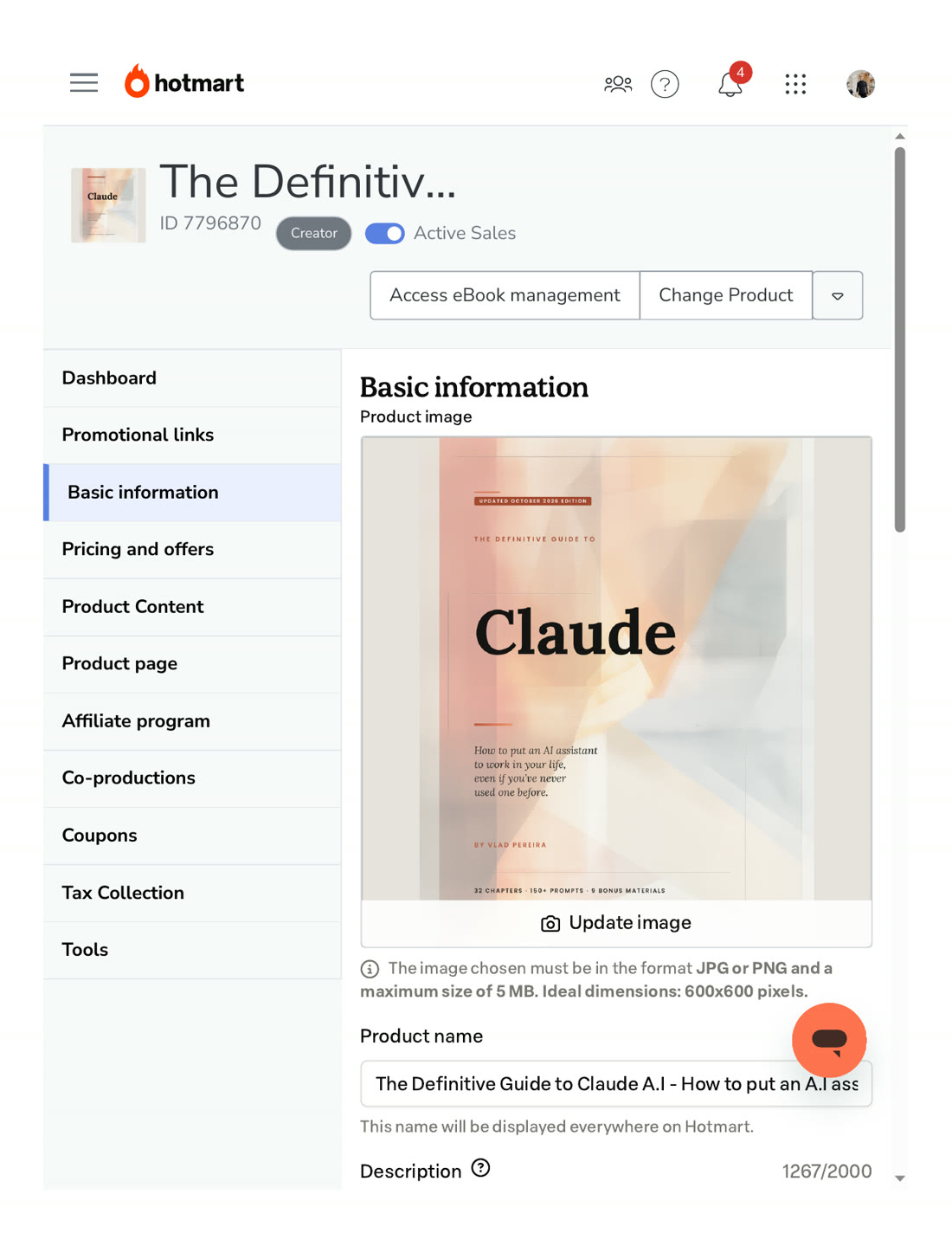 The Basic information screen of my Claude guide, October 24, 2026. This is where the name, the cover and the description live after the product exists.
My two editions split at the language field. The English guide and the Portuguese guide, Claude I.A Sem Mistérios, are two products in the same account, each with its own language, its own description and its own listing. Keeping them apart lets each language carry its own title, cover and guarantee line on its own listing.
Pricing: currency, guarantee and payment method
For any format that is not a subscription or a community, the Pricing tab asks for four decisions.
- Currency. The currency the product is sold in. My English and Portuguese guides each have their language and currency set in their own product, so changing one never touches the other.
- Guarantee period. How long a buyer has to ask for a refund: 7, 15, 21 or 30 days. My English guide's public listing shows 7 days, the shortest of the four.
- Payment method. A one-time payment, installments with fees, or installments without fees for the buyer, with a maximum number of installments.
- Currency conversion. Whether international buyers see the price converted.
On my English guide's public listing, the 7-day guarantee is printed where a buyer reads it before paying.


Get the free Already Viral Starter Kit
The four steps I used to recreate my first viral video with AI: pick a format that already went viral, score it, choose a twist and brief your first recreation in 10 minutes. After that, my newsletter: news, offers and updates by email from Vlad Pereira. You can unsubscribe at any time. Privacy policy
Upload the ebook in Product Content
After pricing, Hotmart takes you to the Product Dashboard. The file goes into the Product Content tab, which opens with Hotmart's rules before the upload area.
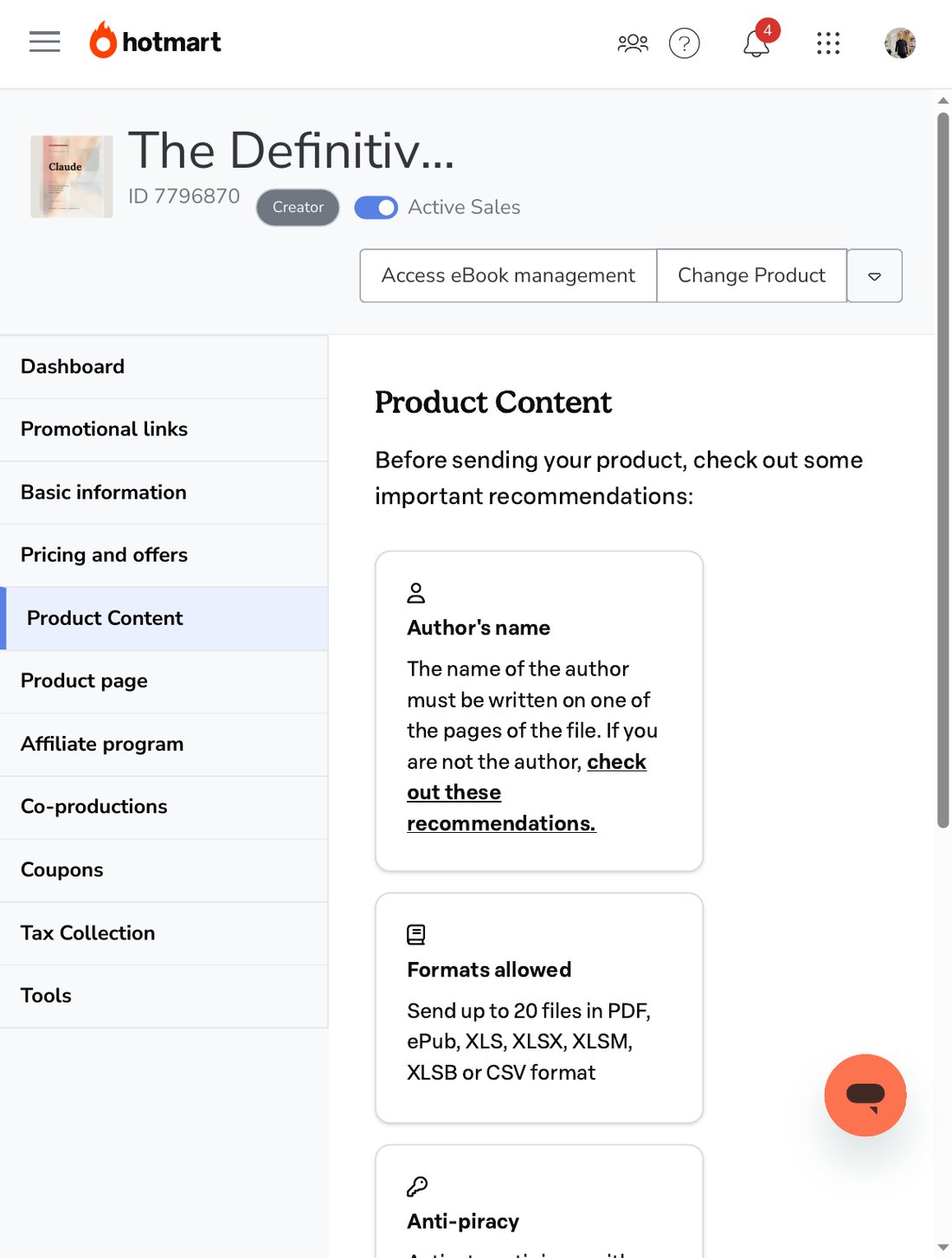 The Product Content screen for my Claude guide, October 24, 2026: the author's-name rule and the formats Hotmart accepts. The file list sits below this view.
The cards on that screen match the help center. For the eBook format you can send up to 20 files, each up to 250 MB, in PDF, ePub, XLS, XLSX, XLSM, XLSB or CSV. My guide fills one of those twenty slots, with a single PDF. The author's name has to be visible in the file, and Hotmart recommends turning on Social DRM against illegal sharing. Its Social DRM article explains what that does. On a PDF, Hotmart prints a visible watermark on every page, with size, color and position you choose, and can add copy, print and password protection. On an EPUB, it hides marks with the buyer's full name and email inside the file. You switch it on under Tools, then Protection for ebooks. The same article warns that copy and print protection may not work in every PDF reader, so treat it as a deterrent with the buyer's name on it.
The menu on the left of that screenshot is the whole product, top to bottom: Dashboard, Promotional links, Basic information, Pricing and offers, Product Content, Product page, Affiliate program, Co-productions, Coupons, Tax Collection and Tools. A first product needs only a few of them. Coupons, co-productions and the affiliate program can wait until the book has sold to anyone at all.
Choose where the product is sold
The Product page tab decides where buyers land. Hotmart offers three options:
- Marketplace. On by default. The product gets a public listing inside Hotmart Marketplace.
- Custom sales page. A page built with Hotmart Pages.
- External sales page. A page on your own site. You enter its address and the Hotlink, the product's sales link, sends buyers there.
My guide has a listing on Hotmart Marketplace and its own page on this site, The Definitive Guide to Claude, with the chapters, the page count and the format. The buy button on that page opens Hotmart's checkout in a window over my page, so the buyer stays on my site and the payment still runs through Hotmart. The Marketplace listing is where people already browsing Hotmart can find the guide, and my own page is where readers of this site already are, with room to say more than a listing allows. You do not need a website to start. A Marketplace listing is enough for a first product, and the site can come later.
Submit it, and what Hotmart's verification checks
Before you can submit, the Personal information tab has to be complete. Then open the Panel tab and click Submit product. Hotmart's help center says the verification usually takes about 15 minutes and can take up to one business day. If something does not match, a notification arrives and the product dashboard shows the instructions.
Hotmart publishes the most common reasons a product is unavailable for sale. Six of them apply to almost every ebook:
- The content is available online for free. Hotmart asks you to remove it or make it exclusive to buyers.
- Potential copyright infringement. Use only material you own or are allowed to use.
- The sales page is unavailable. An external page that is down, moved or mistyped blocks the product.
- The description does not match the content. The page promises something the file does not deliver.
- Generic or AI-generated content. Hotmart flags content that is superficial, falls short of the depth the description promises, or was not created organically, and asks for detailed explanations, practical examples and case studies.
- Promises of financial, health or wellness results. A description or sales page that guarantees money or a health outcome does not pass.
Number 4 is the one my own listing drifted toward. When the October edition of my guide came out, the listing still described the earlier edition's chapter and worksheet counts. On October 24, 2026 I updated the description for 32 chapters and 9 worksheets.
Selling from Canada
I sell from Canada, and my product record, upload, product page and verification followed the same steps Hotmart's help center gives every seller. What changes outside Brazil is the money side. Hotmart's purchase terms decide which Hotmart company takes each payment: a buyer here in Canada goes through Hotmart BV in Amsterdam, and a buyer in the United States paying in US dollars goes through the American company.
Hotmart's article on registering a bank account abroad adds one step to plan for. The bank form opens only after your first sale, once your registration data is approved. The account has to be in your country of residence, in the same name as your Hotmart account, and Hotmart takes up to five business days to check it.
Already Viral, my guide to recreating viral videos with AI, went through these same screens on its way to launch on October 20, 2026. To see what the finished listings look like from the buyer's side, every guide I sell, in English and in Portuguese, is on my e-books page.

Vlad Pereira is an artist first: a former professional ballet dancer who now works as a digital artist, graphic designer, and web and systems developer in Courtenay, British Columbia. A principal dancer with the Goh Ballet from 2009 to 2013, he designs projected backdrops for dance and theatre, builds websites for small businesses through his studio, Vlad Pereira Online, and writes practical guides to AI tools for small business owners.
FAQ
How long does Hotmart take to approve a product?
Hotmart's help center says that after you submit a product it goes through a verification that usually takes about 15 minutes and in some cases up to one business day. If something does not match, you get a notification and the product dashboard shows what to fix.
What file formats can I sell as an ebook on Hotmart?
For the eBook format, Hotmart accepts PDF, ePub, XLS, XLSX, XLSM, XLSB and CSV, up to 20 files of 250 MB each. The file should have a cover with the author's name and a title that matches the product name. My Claude guide is one PDF.
Do I need a website to sell on Hotmart?
No. A product can sell from Hotmart's own Marketplace, which is switched on by default, or from a page built with Hotmart Pages. If you already have a website, you can enter its address as an external sales page and Hotmart sends buyers there.
Can I sell on Hotmart from Canada or the US?
Yes. I sell my guides through Hotmart from Canada, in English and in Portuguese, from one account. The setup steps are the same anywhere. What changes outside Brazil is the bank account and tax side, which Hotmart's help center covers in its own articles.
More in this lane.
Is Hotmart Legit? What a Seller in Canada Sees
I sell my guides on Hotmart from Canada. Two seller screens, the page a buyer sees, what Hotmart's own pages say, and four checks to run before you pay.
My Watch Buzzed, and It Wasn't a Bill
A stranger bought a book I wrote once, and my watch told me about it while I was living my life. The quiet feeling of building digital products that sell themselves.
How I Built a Full EV Publication by Myself, Using AI as a Tool
A local knowledge base, an AI drafting pipeline, quality gates, and a command centre, on one PC in Courtenay for under $300. One person, a whole publication.
 Free with the newsletter
Get the free Already Viral Starter Kit
The four steps I used to recreate my first viral video with AI: pick a format that already went viral, score it, choose a twist and brief your first recreation in 10 minutes. After that, my newsletter: what I am building, what I am learning, and the practical side of running small ventures beside a full-time job, plus news, offers and updates.
Free PDF, 14 pages, fillable. News, offers and updates by email from Vlad Pereira. You can unsubscribe at any time. I send the newsletter with Kit and Substack, so they keep your email too. · Privacy policy
I also publish on Substack: different essays, written for the inbox, the same long game.
Also on Substack