How to Build a Personal Brand for Your Creative Kid
A step-by-step guide to building your creative kid's brand: domain, blog, YouTube, email, store, with them as the author. Symphony's site is the worked example.

May contain affiliate links; I may earn a commission at no extra cost to you. Everything here is my opinion. Full disclosures
My daughter Symphony had just turned ten when she told me she wanted to be a YouTuber. I did not laugh. I did not lecture. I sat down at the kitchen table and asked the only question that actually mattered: "What would you want to make?" Eight months later, SymphonyBelle.com is hers, the blog, the YouTube channel, the merchandise line, even an interactive music game with a global leaderboard. My job is the boring stuff. Her job is to be the creative.
If you have a kid who is asking for a YouTube channel, a website, an Instagram account, a Roblox thing, a brand, anything that says, I have something to share, this post is the long-form answer I wish someone had handed me when Symphony first asked. By the end of this post, if you follow it, your kid will have a real personal brand: a real domain name, a real website, a real blog, a real YouTube channel, a real email list, and a real merchandise store. Nothing in this stack has to be expensive. Most of it can be set up in a single weekend if you have the time.
Key Takeaways
Small upgrades to your wellbeing and lifestyle. Simple, well-reviewed items to support your journey. As an Amazon Associate I earn from qualifying purchases, at no extra cost to you.

grace and stella Eye Serum Roller - Under Eye Brightener with Caffeine, Retinol and Niacinamide
Travel-size cooling rollerball delivering caffeine and retinol serum under eyes to reduce puffiness and dark circles.
Check price on AmazonWhy Build a Brand for Your Kid at All
There is a particular kind of conversation that happens between a parent and a creative kid, and it goes badly more often than it should. The kid lights up about something, making videos, writing a book, drawing comics, designing a game, starting a band, and the parent's first instinct is to manage expectations. Most YouTubers do not make money. Most books do not get published. Most bands do not make it. All of that is true, and none of it is the point. The point is what the kid actually builds along the way.
Symphony is ten. She does not have a job, and I do not give her one. The brand is mine to operate. The supplier conversations, the email dashboard, the spreadsheet, the inventory drawer, those stay on my side of the table. Symphony's only role is the playful one. Do you like the pink earrings or the yellow ones? It's Easter, what should we say to people in the newsletter? Should we send them a colouring drawing for them to colour? Those are five-minute conversations over breakfast. They are the entire kid-side input. The rest of what looks like work happens after she has gone to bed. Childhood is for being a child. They will grow up to be adults and they will have to work; that moment is not now. The skills she picks up, what a logo is, why fonts matter, what a colour palette does, what an audience is, are a side effect of being given a stage to be herself on, not a curriculum I am running on her. The brand is not the goal. The brand is the container.
A personal brand is also a portfolio. By the time Symphony is fifteen, she will have a body of work, videos, blog posts, songs, designs, merchandise, that she made over the back half of her childhood. That portfolio belongs to her. If she ever wants to apply to a creative program, ask for a scholarship, pitch a project, or just remember who she was at ten, the body of work is right there. We do not normally think of childhood as a phase that gets to leave a portfolio behind. It can, if you set it up.
And, quietly, building a brand teaches a kid the basics of the modern economy in a way that nothing else does. They learn what a domain is. They learn that the internet has owners. They learn that the platforms they spend their afternoons on are businesses. They learn the difference between making something free and selling something. None of that is taught in school in any structured way, and all of it is now part of being a literate adult. If your kid is going to grow up online anyway, you might as well let them grow up on their own corner of it.
One afternoon Symphony watched me work on a video game I was designing for a client. She asked, in the kind of voice ten-year-olds use when something has just slotted into place, whether making games is what I do for work. She does not yet fully understand that I run multiple ventures alongside my full-time day job, I wrote about that in Many Little Streams Make a River, but in that moment, she asked if I could make a game for her too. I said yes immediately, sat down with her, and asked her how she would want the game to feel. She wanted something like Pokémon, but instead of catching creatures, you catch musical notes that each have their own tones and pitches, by throwing a Notebook (her word; picture a Pokéball) at them as they drift across the screen. I collected her answers and built the game. It now lives on her site, free to play, and you can try it here. That is the kind of thing a personal brand quietly makes possible. The brand is the container that says yes, your idea is real enough to build.
Get the next post in your inbox.
One email when there is something new worth reading. No spam, leave any time.
Small upgrades to your wellbeing and lifestyle. Simple, well-reviewed items to support your journey. As an Amazon Associate I earn from qualifying purchases, at no extra cost to you.

Pure Daily Care NanoSteamer Large 3-in-1 Nano Ionic Facial Steamer with Bonus Skin Kit
Nano-ionic steamer that opens pores, doubles as a room humidifier, with a bonus steel blackhead-extractor kit.
Check price on AmazonThe Stack, Step by Step
Step 1: Pick the name. Before you buy anything, sit down with the kid and pick the brand name. This is the only step where the kid has to do most of the work, and it is the step that everything else depends on. The brand name has to be one your kid will still want to be associated with in five years, which means it should lean closer to who they are than to what they currently like. Symphony's brand is named after her, with a slight tweak, her middle name is Belle, so SymphonyBelle.com became the obvious choice. Her name itself is the family through-line: her mom and I were both professional ballet dancers, music has always been the language of our house, and "Symphony" is the word that already carried that. The brand simply adopted the through-line. If your kid's name is taken or too common, that kind of tweak does most of the work. SymphonyBelle leaves room for her to grow in any creative direction without renaming. SymphonyDoesMinecraft would have aged badly by week eight.
While you are picking the name, check three things in parallel: the .com is available, the main social handle is available on Instagram, YouTube, and TikTok, and there is no other public-facing person or brand already using it. If all four match, you have a real brand name. If even one is taken, keep tweaking. A name with a missing social handle becomes a maintenance problem forever.
Step 2: Buy the domain. This is the first thing you actually pay for. A .com domain runs about fifteen US dollars a year, and you only need the .com to start, every other extension can wait. The service I use is GoDaddy, which has the lowest cognitive overhead of anything in the category. You type the name into the search box, the system tells you which extensions are available, you click .com, you pay, and you own the name. Click here to search domain names on GoDaddy. If the .com is available, register it for at least one year. If it is not, GoDaddy will suggest near-matches. You can also use the same dashboard later to set up email forwarding, so, for example, hello@yourbrand.com routes to your inbox without you needing to set up a separate email account at all.
Step 3: Get hosting. Hosting is the part most parents get tripped up by, because the word sounds technical when it really is not. Hosting is just renting space on a server somewhere so your website has a place to live. For an absolute beginner, the easiest path is HostGator on their cheapest shared hosting plan, which is usually under five dollars a month. The plan includes one-click WordPress installation, which is what you want for the website itself. Click here for HostGator hosting. Pick the basic shared hosting plan, point it at the domain you just bought from GoDaddy (HostGator's setup walks you through the DNS connection in plain English), and let the one-click WordPress installer do its job. Twenty minutes of your time, total.
Step 4: Build the website with WordPress. WordPress is free, open-source, and runs roughly forty percent of the websites on the internet. It is also the right choice for a kid's brand because it grows with them. The blog, the merch store, the embedded YouTube videos, the email signup form, the photo galleries, all of these are WordPress plugins that you add one at a time as the kid grows into them. You do not need to commit to all of it on day one.
Pick a clean, simple theme. Something with a single column for posts and a clear header where the kid's name sits at the top. Set the front page to feature the kid's most recent activity, videos and blog posts at the top. Add an About page in the kid's own voice. Symphony's about page on SymphonyBelle.com is in her own words. She told me what she wanted on it one morning over breakfast, I wrote it down and tidied it up, and she gave it her thumbs up. Her voice is the part that has to come through; the typography is the part that has to get out of the way.
Step 5: Start the blog with light SEO. The blog is what brings strangers to your kid's site. Without a blog, the website is a brochure that nobody finds. With a blog and even a small amount of search engine attention, the site starts pulling in readers who searched for something the kid happens to write about. For Symphony, the blog has posts about her favourite songs, her piano lessons, behind-the-scenes notes from the videos she has made, and pages about the world inside her music game. I write the posts. She tells me what she wants them to say.
The SEO basics that actually matter for a kid's blog are short and unfancy. Each post has a clear title with a real keyword phrase in it, written for humans first. Each post has alt text on every image. Each post links to at least one other post on the same site. Each post is at least eight hundred words. Each post has one focused topic. None of this requires any tool more sophisticated than common sense. Aim for one or two posts a month, sustainable beats prolific every time.
For the design assets that go in the blog (header images, social cards, post graphics), the tool I use is Canva. Canva Pro at about twelve dollars a month gives you a brand kit, which means you set your kid's brand colours, fonts, and logo once and every new design pulls from the same library. Click here for Canva. The free tier is enough to get started; the Pro tier is worth upgrading to as soon as the kid's brand has a consistent look you want to keep.
Step 6: Start the YouTube channel. YouTube is free and runs on a Google account. The cleanest setup is a Google account in your kid's brand name that you control the password for. The channel name should match the brand name exactly. The channel art comes out of Canva, they have YouTube banner templates that already have the right dimensions. The profile photo should be something simple and recognisable; for Symphony, hers is a small portrait she drew herself in Procreate and turned into a circular avatar.
The upload cadence question matters more than most parents think. The answer is: whatever is sustainable. One video a month is great. One video a week is intense. One video a day is a treadmill that will end the project before it starts. Symphony posts when she has something she wants to post, and the months she has the most fun are also the months she ends up posting the most. Forced cadence kills creativity, and creativity is the entire reason you are doing this.
Embed each new video on the website as it goes up. WordPress will let you paste the YouTube URL directly into a post and turn it into an embedded player automatically. The video lives on YouTube. The playable version lives on your kid's site. Both grow together.
Step 7: Set up the email list. The email list is the most underrated piece of the entire stack. Followers on social platforms are rented; an email list is owned. If Instagram disappeared tomorrow, your kid's email list would still work. The tool I use is Kit, formerly known as ConvertKit, which has a free tier good for up to ten thousand subscribers and is built specifically for creators rather than corporate marketers.
Click here for Kit. Set up one signup form on the website with a single field for email, label it something like Get my monthly update from [Kid's Name], and write the welcome email yourself, in the kid's voice. The email list is entirely a parent-operated channel, you handle the dashboard, the sequences, the deliverability. The kid is invited in only for the playful moments. It's Easter, what should we say to people in the newsletter? Should we send them a colouring drawing of yours for them to colour? Those are five-minute conversations at the breakfast table, and they are the whole kid-side input. Every monthly update is one short message in their voice, what they made this month, what they are working on next, one photo or video, and you write it.
Step 8: Open the merchandise store. This is the part that feels like a leap, but in practice is the easiest step on the list. There are two viable paths depending on whether you want to handle physical inventory or not.
The hands-off path is print-on-demand. Printify is the standard tool. You upload a design, you pick a product (t-shirt, hoodie, sticker, tote, mug), and Printify prints and ships when an order comes in. Nothing is inventoried at your house. Nothing is shipped from your house. The kid's job is to pick a favourite from a few designs you mock up in Canva. Click here for Printify. Connect it to the WordPress site through their WooCommerce plugin, or set up a small Shopify store and connect Printify to that, both paths work.
The hands-on path is direct sourcing, which is the model Symphony's store on SymphonyBelle.com uses. Symphony came to me one afternoon and said she wanted to sell things to save up for a Disney trip with her aunt. That was the entire pitch, and it was the right pitch, a concrete goal the kid actually wants is the engine that keeps any of this alive. Symphony's mom and I are divorced, which means Symphony goes back and forth between two houses on a regular schedule. A physical store would have been a coordination nightmare. Online was the only model that fit our family, so online it was.
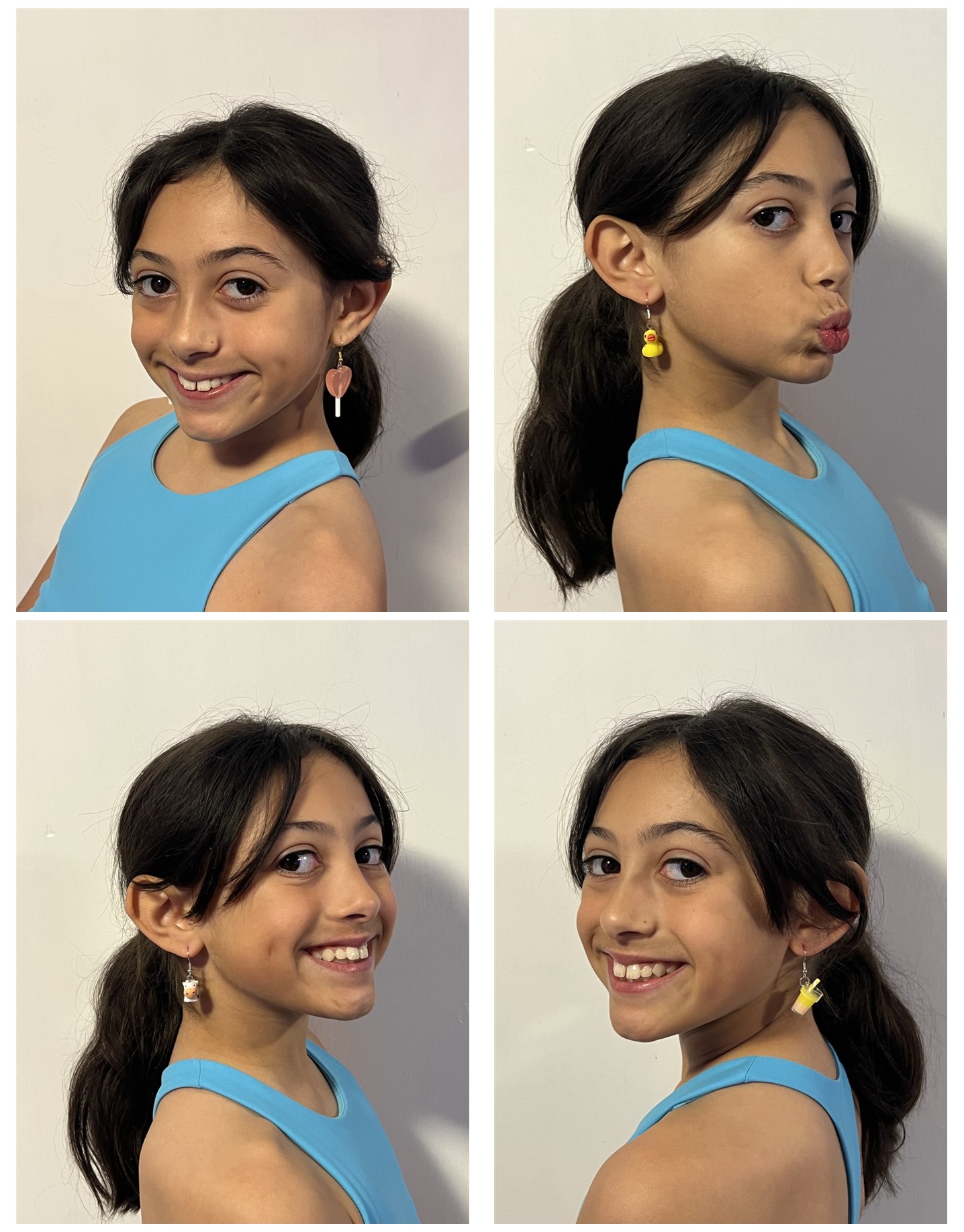
For the first product line, I went looking for a supplier and found a beautiful vendor in China with cute, kid-friendly designs, little ice creams, ducklings, flowers, clouds, rainbows, everything that already felt like Symphony. I picked a wide selection from the catalogue and brought it to her at the kitchen table. Do you like the pink earrings or the yellow ones? She pointed at her favourites. I placed the order. When the earrings arrived, I photographed them for the site, calculated landed cost and a fair sale price, packaged them into individual gift envelopes, and listed them. Inventory lives in a small drawer at home. When an order comes in, I mail it out the next day. The supplier conversations, the pricing, the inventory drawer, the post office runs, all of that stays on my side of the table. Symphony's role is exactly the fun part, and only the fun part. She points at the cute ones. She wraps a few pairs with me sometimes because it feels like wrapping presents. That is the whole ask. Whatever she picks up about how a small business actually runs, she picks up by watching, not because I taught her.
Symphony thinks the earring money is what is going to fund her Disney trip with her aunt. It is not. It goes straight into her college fund, and she will not see a dollar of it until she is eighteen. The joke is on her, except the joke is also on me, because that means I am the one quietly funding the Disney trip out of my own pocket. If you have a kid, you already know exactly how that math works.
Either model is correct. For most parents starting out, the print-on-demand path is the easier opening move. For kids who want to actually touch their merchandise and hand a real thing to a friend at school, the hands-on path is more memorable. Whichever path you pick, start small. Three or four products is plenty for a first launch.

Step 9: Wire it all together. At this point you have all the moving parts. The last step is making them feel like one thing instead of seven. The website is the home, every other surface points back to it. The YouTube channel description has the website URL. The Instagram bio has the website URL. The email signup is on the website. The merchandise is on the website. The blog drives traffic from search. The newsletter goes out from the website. The brand kit in Canva is the visual glue that makes all of it feel like the same person made it.
Symphony's site does this through the navigation: video page, blog, music, game, shop, contact. Each section is short and well-lit. Each section uses the same colours and fonts. A reader who lands on the blog from Google can find the YouTube channel in two clicks. A viewer who lands on a YouTube video can find the merchandise store in two clicks. The brand becomes the kid, and the kid becomes the brand.

Brazilian-Canadian on Vancouver Island. Former ballet artist, current builder of small ventures. Posts here cover health, income, and the long game.
FAQ
How much does the full stack cost per month?
Roughly twenty to forty US dollars a month once it is running, plus about fifteen dollars a year for the domain. The breakdown is approximately five dollars a month for hosting on HostGator, twelve dollars a month for Canva Pro if you upgrade beyond the free tier, free for Kit on the starter plan (up to ten thousand subscribers), free for Printify with product cost only when an order comes in, and free for YouTube. The largest line items are the ones you choose to upgrade as the brand grows.
How old should my kid be to start?
Symphony had just turned ten when we started. We did the heaviest setup work over the first few months, and she has been gradually taking over more of the day-to-day work since. The minimum age is whatever age your kid is when they say I want to make something and share it. The maximum age is whenever they leave home. There is no wrong end of that range.
What if my kid changes their interests in a year?
This is the single most important reason to pick a brand name that is broader than the current interest. Symphony's brand is named after her, not after music or dance or any particular topic. If her interests pivoted entirely to drawing tomorrow, the website would not need to be rebuilt, the about page would update, the blog would shift, the YouTube channel would take a new direction, and the brand name would still work. Pick a container, not a category.
Do I need to be technical?
No. The hardest single thing in the entire stack is connecting the domain you bought from GoDaddy to the hosting account you bought from HostGator, and even that is a copy-and-paste of two name server addresses. Both companies have step-by-step guides for the exact handoff. Everything else is point-and-click in a browser.
How do I keep my kid safe online?
A few rules I follow. No public comments on the kid's site or YouTube channel without parent moderation. No real-time location data, no school name, no last name beyond what is in the brand name. The email list goes through Kit, where the parent owns the account. All YouTube videos are reviewed by the parent before they upload. Direct messages on social channels are either turned off or routed to a parent-managed inbox. The kid's first job is to be the creator; the parent's first job is to be the gate.
Should the kid own the email and accounts?
While they are a minor, you own the accounts and the kid is the named creator. The handoff happens gradually. Symphony already owns her own posting decisions; she does not yet own the password. When she is fifteen or sixteen and asks for the password, that conversation will happen on its own.
How long until they get followers?
Slower than your kid would like. Faster than you expect. Within the first six months, the audience is mostly family and family of friends. Inside a year, it starts to broaden if the content is good and consistent. By year two, if the kid is still creating, the audience is no longer just people who already know you. None of this is the goal, the goal is the body of work and the skills built along the way, but it is worth knowing the rough shape of the timeline so that neither of you confuses one quiet month for failure.
Can my kid actually make money from this?
Eventually, yes, in modest amounts, and that is the right size of expectation. The merchandise store will sell some items to family and friends, and eventually a few strangers. The YouTube channel will, at some point, qualify for the YouTube Partner Program once it crosses the subscriber and watch-hour thresholds. The email list, if it grows past a few hundred subscribers, becomes a real channel for selling future products. Most kids' brands generate enough income to cover the monthly tools within the first year if they are consistent. Anything beyond that is a bonus. The motivation matters more than the number, Symphony's first store launch was specifically aimed at saving up for a Disney trip with her aunt, and a goal the kid actually wants is the engine that keeps the whole project alive through the inevitable quiet months.
What if my kid loses interest?
It happens. The brand sits patiently until they come back, or it does not, and the body of work they built is still theirs either way. The website does not stop existing because the kid took a break. We have had three or four six-week stretches where Symphony did not post anything, and the brand picked back up exactly where it left off when she was ready. There is no penalty for a fallow stretch. The penalty is when you let one fallow stretch become the end of the entire project.
Is this too much screen time?
It can be. The answer is to count the screen time on the producing side and the consuming side as different things. Producing, writing a blog post, recording a video, editing a thumbnail, designing a t-shirt, builds skills. Consuming, scrolling YouTube to "research", does not. As long as the producing-to-consuming ratio stays at least one to one, the brand is not the part of your kid's day that you need to worry about.
Small upgrades to your wellbeing and lifestyle. Simple, well-reviewed items to support your journey. As an Amazon Associate I earn from qualifying purchases, at no extra cost to you.

URBNFit Pilates Ring - 12 Inch Magic Circle with Dual Grip Foam Pads
12-inch fiberglass Pilates ring with dual-sided foam pads for inner thigh, core, and pelvic floor resistance training.
Check price on Amazon
Etekcity Digital Kitchen Scale, Grams and Oz, 304 Stainless Steel, LCD Display
Stainless steel digital kitchen scale with LCD display measuring grams, ounces, and millilitres.
Check price on Amazon
Hatch Restore 3 Sunrise Alarm Clock and Sound Machine, Smart Light
Bedside sunrise alarm clock that simulates a gradual dawn to wake you naturally, with app-controlled sleep routines and no screen on the device.
Check price on Amazon
Everything I write comes from one idea: build a life you own, one stream at a time.
Want me to show you exactly how I do it, step by step, in your language? This is where it starts.
Come build with me
Curious about Bioactive Precision Peptides, but not sure where to start?
Take the free 2-minute Wellness Quiz. It reads your answers and shows you where and how Natural Bioactive Precision Peptides could support your wellbeing.
Take the 2-minute quizMore in this lane.
My Daughter Has a Hundred Dreams. We Just Opened a Store for One of Them.
My daughter's brand Symphony Belle has a real online store now. I did not know how to build any of it. The first shelf cost a little over sixty dollars.
The Road to Premier: Building This in the Open
I set myself a goal in MAKE Wellness, Premier Affiliate, and I am doing the work in public: what the rank is, the volume behind it, and the daily plan.
Network Marketing in Canada: Building a Team From Scratch
MAKE Wellness only opened in Canada on July 1, 2026, which means I am early, with no local proof and no network. That sounds like a disadvantage. I think it might be the opposite.

Get the next post in your inbox.
One email when there is something new worth reading. Writing on health, income, and the practical reality of building a life on your own terms. No spam. Easy to leave at any time.
Unsubscribe with one click, any time. Your email stays with me and Kit, my email provider. · Privacy policy
I also publish on Substack: different essays, written for the inbox, the same long game.
Also on Substack